Toggles
Shulker Tooltip
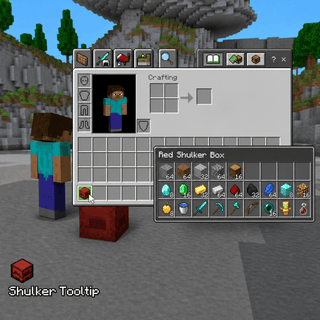
Preview shulker contents in item tooltips.
Free on mobile. Included in every PC plan.


What does Shulker Tooltip do?
Shulker Tooltip is a toggles module in Lunar Proxy for Minecraft Bedrock Edition. Preview shulker contents in item tooltips. Hover a shulker box and see what is inside without placing it, which speeds up sorting storage rooms. Because Lunar runs as a proxy, Shulker Tooltip works on PC, Android, and iOS, and on Xbox, PlayStation, and Switch when the console connects through it. You turn it on from the in-game ClickGUI or with a chat command, and its settings are saved in your configs.
How do I turn on Shulker Tooltip?
- 01 Install Lunar on your phone or PC. Free on Google Play and the App Store; PC needs a subscription.
- 02 Connect to a server, Realm, or friend’s world from inside Lunar. Consoles then join through the Friends tab, the LAN list, or direct connect.
- 03 Open the in-game ClickGUI and switch on Shulker Tooltip, or type the Shulker Tooltip command in chat. Adjust its settings right in the panel.
Which devices does Shulker Tooltip work on?
Lunar is a proxy, so Shulker Tooltip behaves the same on every device that connects through it.
- PC
- Android
- iOS
- Xbox
- PlayStation
- Switch